



Industry Skills Classroom Training

Power BI Developer

This course enables you to walk out not just with knowledge — but with the confidence, skills, and real project experience to land a Power BI Developer role. You will be fully prepared to design data models, write advanced DAX, build enterprise dashboards, manage Power BI Service, and deliver results from Day 1 on the job — with the added advantage of being PL-300 certification ready.

5.0 (8 ratings)
17 enrolled 3 Months | 4 hours/day Professional Tamil

What You'll Learn

  • Master SQL & DAX for Professional BI Development
  • Build & Publish Enterprise-Level Reports and Dashboards
  • Design Optimized Data Models for Business Reporting
  • Secure Data with Row Level Security & Access Control
  • Deploy & Manage Reports via Power BI Service
  • Go from Job Seeker to Job-Ready Power BI Developer

Requirements

  • Basic Computer Knowledge
  • No need of previous coding knowledge
  • Suitable for Both IT and Non-IT Students

Tools & Technologies

PostgreSQL PostgreSQL
Power BI Power BI
DAX Studio DAX Studio

Course Description

A professionally designed, industry-aligned classroom program built exclusively for job seekers who are serious about becoming a Power BI Developer. This course goes beyond basic reporting — it trains you to design, build, secure, optimize, and deploy enterprise-level Power BI solutions — giving you the confidence to walk into any company and deliver from your very first day at work.

Right for You?

Who This Course is For

  • Fresh Graduates Looking to Start Their Career as a Power BI Developer
  • Job Seekers Who Want to Go Beyond Basic Dashboards and Build Enterprise BI Solutions
  • Candidates Who Prefer Structured Classroom Learning with Mentor Support
  • Anyone Ready to Commit and Become a Certified Job-Ready Power BI Developer

Course Curriculum

17 modules • 160 lessons
Module 1: SQL for Power BI Developer 15 lessons
  • Introduction to Databases & SQL
  • SQL Syntax & Query Structure
  • Filtering & Sorting Data
  • Aggregate Functions & Grouping
  • Join Operations
  • Subqueries & Nested Queries
  • Conditional Logic & CASE Statements
  • Window Functions
  • Common Table Expressions (CTEs)
  • String, Date & Numeric Functions
  • Data Cleaning & NULL Handling
  • Views & Stored Procedures
  • Indexes & Query Optimization
  • Writing SQL Queries Optimized for Power BI
  • Module 1 Clearance Test
Module 2: Power BI Fundamentals & Interface 6 lessons
  • Introduction to Power BI & Ecosystem Overview
  • Power BI Desktop - Interface & Navigation
  • Power BI Workflow - Extract, Model, Visualize & Publish
  • Power BI vs Other BI Tools
  • Power BI Licensing & Versions Overview
  • Module 2 Clearance Test
Module 3: Data Extraction & Data Sources 9 lessons
  • Manual Data Entry in Power BI
  • Loading Data from Excel & CSV
  • Loading Data from XML & PDF
  • Loading Data from SQL Database
  • Loading Data from Web & Web API
  • Loading Data from SharePoint & OneDrive
  • Connecting Multiple Data Sources
  • DirectQuery vs Import Mode vs Live Connection
  • Module 3 Clearance Test
Module 4: Data Transformation - Power Query Editor 24 lessons
  • Introduction to Power Query Editor
  • Managing Queries & Parameters
  • Filtering Rows - Number, Text & Date Columns
  • Advanced Filtering & Logical Operations
  • Managing Columns - Rename, Reorder, Remove
  • Keep & Remove Rows
  • Handling Duplicates, Blanks & Errors
  • Sorting & Replacing Values
  • Split Column Operations
  • Group Rows & Aggregations
  • Data Type Management & Header Operations
  • Append, Merge & Combine Queries
  • Merge Types & Join Kinds
  • Transpose, Reverse & Count Rows
  • Fill, Convert to List & Column Operations
  • Text Formatting & Text Extraction
  • Statistics & Math Operations
  • Date & Time Functions in Power Query
  • Adding Custom, Conditional & Index Columns
  • Adding Columns from Example & Custom Functions
  • R Script & Python Script Integration
  • View Operations & Query Dependency
  • Reusing Data Models
  • Module 4 Clearance Test
Module 5: Data Modeling & Relationships 10 lessons
  • Data Modeling Concepts & Best Practices
  • Schema Design - Star & Snowflake
  • Fact & Dimension Tables
  • Relationships, Cardinality & Cross Filter Direction
  • Measures & Calculated Columns
  • DAX Tables & Calculated Tables
  • Calculation Groups
  • Model Security & Row Level Security
  • Q&A Setup & Synonyms
  • Module 5 Clearance Test
Module 6: DAX - Queries & Foundations 7 lessons
  • Introduction to DAX & DAX Studio
  • Connecting Power BI Data Model to DAX Studio
  • EVALUATE & Column Selection
  • ORDER BY & START AT
  • ROW & Variables (VAR & DEFINE)
  • DAX Operators - Arithmetic, Comparison, Text & Logical
  • Module 6 Clearance Test
Module 7: DAX - Table Manipulation Functions 10 lessons
  • DISTINCT & ADDCOLUMNS
  • GENERATESERIES & DATATABLE
  • CROSSJOIN, GENERATE & GENERATEALL
  • Natural Join Operations
  • SUMMARIZE & SUMMARIZECOLUMNS
  • ROLLUP, ROLLUPGROUP & ROLLUPADDISSUBTOTAL
  • ADDMISSINGITEMS & ROLLUPISSUBTOTAL
  • Set Operations
  • TOPN
  • Module 7 Clearance Test
Module 8: DAX - Core Functions 7 lessons
  • Aggregate Functions
  • Logical Functions
  • Information Functions
  • Math Functions
  • Text Functions
  • Date & Time Functions
  • Module 8 Clearance Test
Module 9: DAX - Advanced Functions 10 lessons
  • Time Intelligence Functions
  • Parent & Child Functions
  • Relationship Functions
  • Filter Functions - CALCULATE & CALCULATETABLE
  • ALL, ALLEXCEPT, ALLSELECTED & Variants
  • EARLIER, FILTER, KEEPFILTERS & REMOVEFILTERS
  • LOOKUPVALUE & TREATAS
  • Window Functions - INDEX, OFFSET, WINDOW & RANK
  • Filter Context & Row Context Deep Dive
  • Module 9 Clearance Test
Module 10: Data Visualization 12 lessons
  • Data Visualization Principles & Best Practices
  • Choosing the Right Visual
  • Bar, Column, Line & Area Charts
  • Ribbon, Waterfall & Funnel Charts
  • Scatter, Pie & Donut Charts
  • Treemap, Map & Filled Map
  • Gauge, KPI Metrics & Cards
  • Slicers, Table & Matrix
  • Python & R Script Visualizations
  • Key Influencers, Decomposition Tree & Narrative
  • Custom Visuals from AppSource
  • Module 10 Clearance Test
Module 11: Dashboard Building & Report Design 11 lessons
  • Dashboard Design Principles & UI Best Practices
  • Slicers, Filters & Visual Interactions
  • Bookmarks, Buttons & Navigation
  • Conditional Formatting & Highlighting
  • Drill-Through & Drill-Down Reports
  • Tooltips & Report Page Tooltips
  • Building a Sales Performance Dashboard
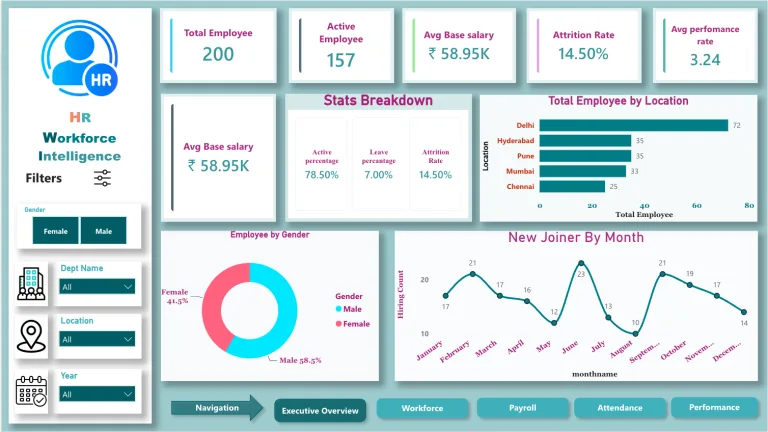
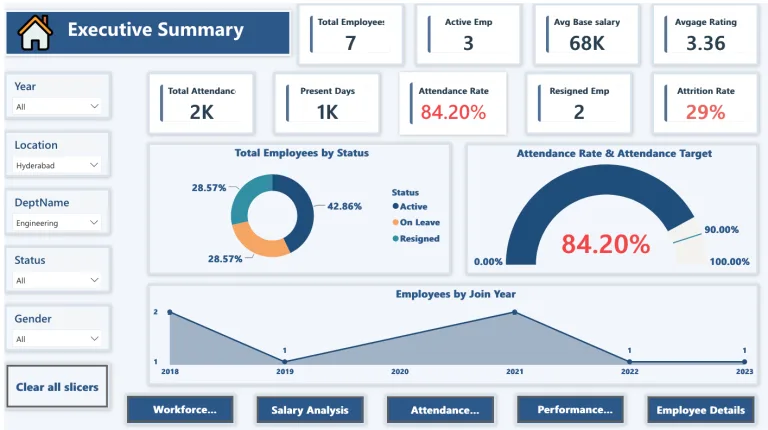
  • Building an HR Analytics Dashboard
  • Building a Finance Dashboard
  • Building an Operations Dashboard
  • Module 11 Clearance Test
Module 12: Power BI Service & Administration 8 lessons
  • Introduction to Power BI Service
  • Publishing Reports to Power BI Service
  • Workspaces - Creating & Managing
  • Power BI Apps - Building & Publishing
  • Scheduled Data Refresh & Gateway Setup
  • Sharing Reports & Dashboards
  • Power BI Mobile Overview
  • Module 12 Clearance Test
Module 13: Row Level Security & Workspace Management 8 lessons
  • Introduction to Row Level Security (RLS)
  • Static RLS - Role Based Access
  • Dynamic RLS - User Based Access
  • Testing & Validating RLS
  • Object Level Security (OLS)
  • Workspace Roles & Permissions Management
  • Dataset Permissions & Access Control
  • Module 13 Clearance Test
Module 14: Performance Optimization 7 lessons
  • Performance Issues & Root Causes
  • SQL Query Optimization for Power BI
  • Power BI Data Model Optimization
  • DAX Optimization Techniques
  • Performance Analyzer & Diagnostics
  • Aggregations & Composite Models
  • Module 14 Clearance Test
Module 15: Power BI REST API & Embedded Analytics 7 lessons
  • Introduction to Power BI REST API
  • Authenticating with Power BI API
  • Automating Report & Dataset Operations via API
  • Introduction to Power BI Embedded
  • Embedding Reports in Web Applications
  • Embed for Your Customers vs Embed for Your Organization
  • Module 15 Clearance Test
Module 16: PL-300 Certification Preparation 7 lessons
  • PL-300 Exam Overview & Structure
  • Prepare Data - Exam Focus Areas
  • Model Data - Exam Focus Areas
  • Visualize & Analyze Data - Exam Focus Areas
  • Deploy & Maintain Assets - Exam Focus Areas
  • Practice Tests & Mock Exam
  • Module 16 Clearance Test
Module 17: Projects 2 lessons
  • Mentored Project
  • Capstone Project
Our Advantage

Why Choose This Course

  • Built Exclusively for Job Seekers
  • Most Complete Power BI Training Available
  • Classroom Training with Real Mentor Guidance
  • PL-300 Certification Ready

Your Instructors

Leelavathi Ramesh

Leelavathi Ramesh

Business Intelligence Analyst

9 Courses

4+ years of experience as a Business Intelligence Analyst, with hands-on expertise at Variablz Technology and Schneider Electric. Statistics graduate with practical experience across Marketing, Production, and Sales Analytics.

Parthiban Kannan

Parthiban Kannan

Co-founder & Manager

17 Courses

14+ years of experience in digital transformation, leading teams of 15+ members and delivering 160+ projects for organizations like Lakshmi Machine Works, Milacron, Schneider Electric, Aatomz Research, and Variablz Technologies. AI innovator with a patent approved by the Government of India, with strong expertise in Data Science, Data Analysis, Business Intelligence, and Software Development.

Course Outcomes

What Our Students Build

Articles, projects, research papers and more — real work by our learners applied beyond the classroom.

Project Work

Superstore Sales Analytical Dashboard

Build my Sales Analytical Dashboard on Super Store Data Dashboard Link: https://app.powerbi.com/view?r=eyJrIjoiNDMzMzcxYjItYmUwNi00NzQ2LWFjNDctZmQwYzAzNTMyMDVjIiwidCI6IjBhMTY1MTY1LTI1YmMtNGMxZC04ZGM3LTU0MTBkODdjZDRmYSJ9&pageName=0e1c207ad51e5cc3aa74 2. Regionwise Analytical Report 3. Time Series Analysis

FAQ

Frequently Asked Questions

Is this course suitable for freshers with no Power BI experience?

Yes. This course starts from the basics of SQL and Power BI and gradually takes you to advanced developer-level skills u2014 no prior experience is required to join.

What are the eligibility criteria to join this course?

Any graduate from any degree is eligible, provided their degree includes Mathematics as a subject.

Is this course suitable for college students or working professionals?

No. This course is exclusively designed for job seekers who are seriously looking to start their career as a Power BI Developer.

Is this an online or offline course?

This is a completely classroom-based training program conducted at our Cuddalore location.

Will I work on real projects during this course?

Yes. You will work on a Mentored Project with trainer guidance and an independent Capstone Project u2014 both built around real-world business reporting scenarios.

What is the difference between this course and the BI Analyst course?

The BI Analyst course focuses on analyzing data and delivering business insights. The Power BI Developer course goes deeper into the technical side u2014 advanced DAX, Power BI Service administration, Row Level Security, REST API, and Embedded Analytics u2014 skills required specifically for a developer role.

Will this course prepare me for the PL-300 certification exam?

Yes. The final module is dedicated to PL-300 certification preparation covering all exam focus areas with practice tests and mock exams.

What kind of companies can I apply to after this course?

You will be job-ready for service-based companies, product companies, MNCs, and analytics firms across Tamil Nadu and South India hiring for Power BI Developer, BI Developer, Report Developer, and Data Analyst roles.